Help topics
Coming soon: the Studio and wearables
Two parts of Myrlin Forge exist but are open only to the Myrlin team today (2026-11-04). This page says what they are so you know what is coming. When they open, the site will show them in Create and My assets.
The Studio
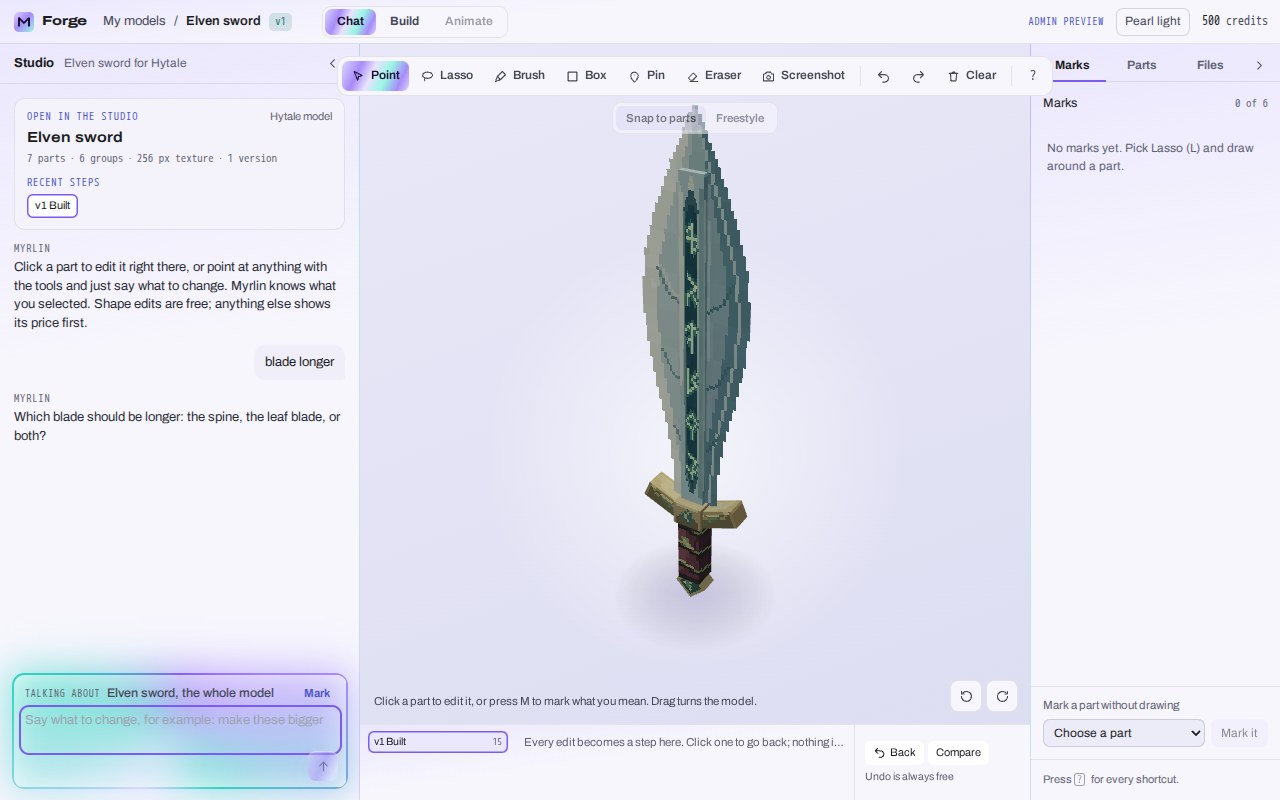
The Studio is a workspace where you talk to Myrlin about one model and point at what to change. You click a part, or mark it with Point, Lasso, Brush, Box or Pin, and say what you want ("make the blade longer"). Myrlin asks when it is not sure, shows the price of anything that costs credits (shape edits are free), and every change becomes a step you can go back to (Back, Compare; undo is always free). Tabs at the top switch between Chat, Build and Animate; the right side lists Marks, Parts and Files.
 (opens the full picture in a new tab)
Wearables
Armour, helmets, hats and other pieces your character wears. When they open:
In Create, the confirm sheet asks whether the model is something you wear and where it goes.
The Hytale pack window gets Wear it in Hytale: pick the slot, nudge the fit, and the pack makes it wearable in game.
The Minecraft window gets Armour you wear: a helmet in 3D and a painted armour set from the same fit (gloves are not possible in Minecraft armour).
My assets gets Export settings and variants: the kind and size per game, and saved variants.
Hats already face forward correctly in Minecraft downloads today.
What it costs
Not available to buy yet. Prices will show on the quote before you confirm, like everything else.
If it does not work
You will not see these yet unless your account is on the Myrlin team. If you want early access or a custom wearable set, write to forge.myrlin.io/work-with-us.
Still stuck? Contact support