AI models and textures with Myrlin Studio
Myrlin Studio is an AI model generator for creators working with blocky 3D assets. Describe an object or add a reference image, then download its editable .blockymodel and painted PNG texture.
From a brief to files
- Describe the shape, proportions and paint. Add a reference when you have a particular look in mind.
- Review the available build and its credit quote. Once you confirm, Studio gives the build its own saved page.
- Follow the reported stages and saved previews. Inspect the delivered model, then download the .blockymodel and PNG texture together.
Builds take several minutes; queues and review can add time. You can leave and reopen the build from your account.
Keep working with the result
The model and texture remain editable. Use the Workbench to adjust parts and paint, or open the source in Blockbench with the Hytale plugin. Your Assets library keeps saved results together.
In your library, choose General, Hytale or Minecraft download. Hytale offers sword asset-pack candidates and model files; Minecraft offers Java resource packs and mod/plugin resources. Follow the Hytale or Minecraft installation steps for your chosen export.
Try Studio
Browse public creations or start with your own idea. The pricing page lists current build prices; your final quote appears before confirmation.
Before you build
- Who is Studio for?
- Creators making blocky models for Hytale, Minecraft Java or their own projects. Choose the download that fits your use and follow its setup instructions.
- Can I inspect an actual result first?
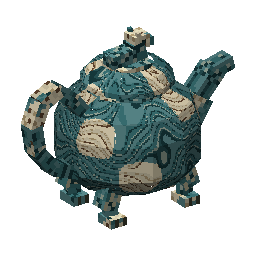
- Yes. The painted teapot has an interactive preview and its original model and texture downloads. You can examine the geometry and atlas before starting a build.
- Does Studio replace Blockbench?
- Studio generates the initial model and paint. Blockbench gives you direct control over the downloaded source. Open .blockymodel files with its Hytale plugin.
- How much does a model cost?
- Studio shows the selected build’s credit quote before you confirm. Check current pricing for credit purchases and available build options.