Help topics
Credits, packs and plans (Pricing and Billing)
Forge runs on credits. A new model is 15 credits. You get 35 free when you sign up. After that you take a plan that adds credits every month; plan members can also buy extra credit packs. Credits never expire, with or without a plan.
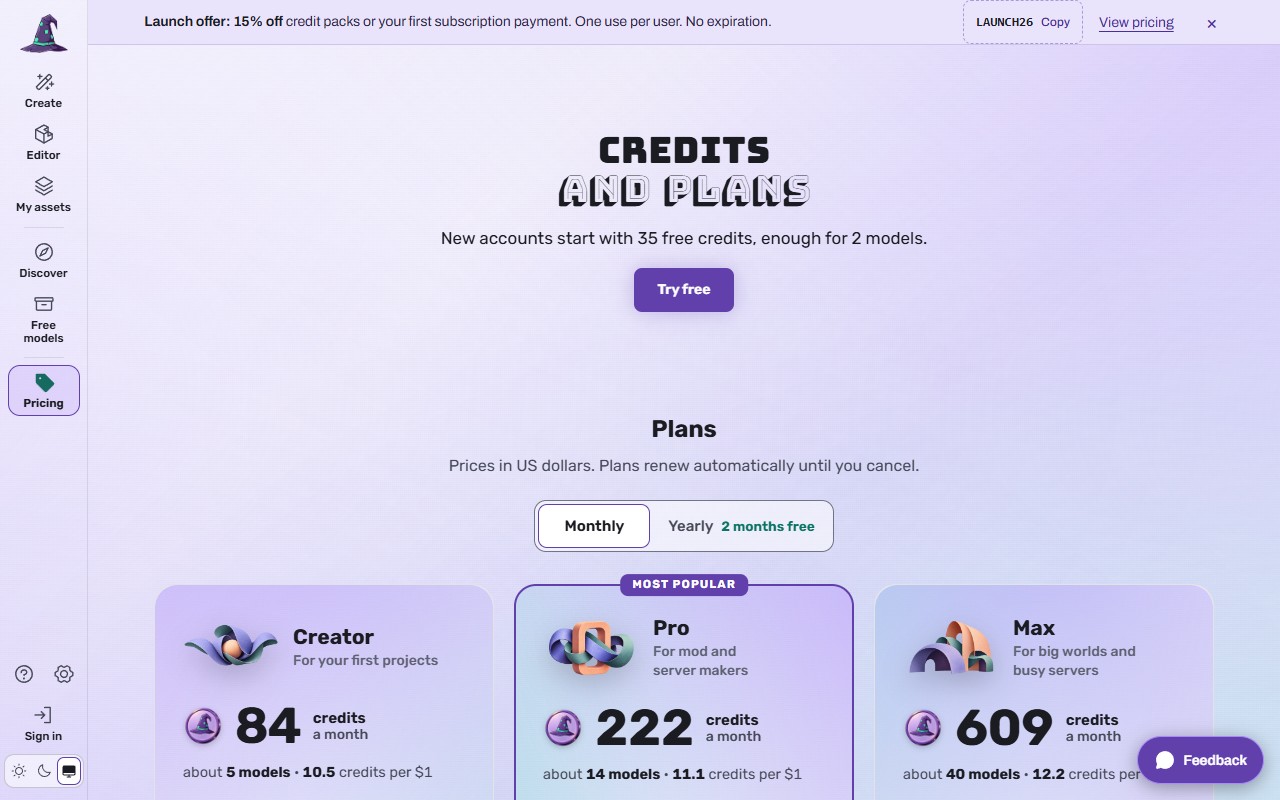 (opens the full picture in a new tab)
The numbers (live on 2026-11-06)
| Price | Credits | About | Also | |
|---|---|---|---|---|
| Free account | $0 | 35 once | 2 models | 3 free models a week, 10 Editor saves a day, builds from AI apps |
| Creator plan | $7.99 a month | 80 a month +4 bonus | 5 models | 10 free models a week, 3 API batch builds at once, 30 Editor saves a day, Private models, buy from and earn from other creators, 10 uploads a month |
| Pro plan | $19.99 a month | 200 a month +22 bonus | 14 models | 30 free models a week, 8 batch builds at once, 60 saves a day, unlimited uploads, the rest as Creator |
| Max plan | $49.99 a month | 500 a month +109 bonus | 40 models | Unlimited free models, 20 batch builds at once, 100 saves a day, the rest as Pro |
| Yearly plans | $76.99, $191.99, $479.99 a year | 960 up front +48 bonus, 2,400 up front +264 bonus, 6,000 up front +1,308 bonus | save 20% | |
| Packs (pay once) | $4.99, $19.99, $34.99, $69.99 | 50, 200, 350 +50 bonus, 700 +150 bonus | 3, 13, 26, 56 models | For plan members |
The site reads these from the live price lists, so the Pricing page is always the latest word. Prices are in US dollars.
Buy a credit pack
Extra credits are for plan members (Creator, Pro or Max). Bought credits never expire, even if your plan ends.
Open Pricing and press Buy under a pack, or press Buy credits (left rail when signed in, the out-of-credits card, or Billing).
Signed out, this opens Billing with your pack marked "Your choice" and a Sign up to buy button. Sign up; you come back with the pack still chosen.
Press Buy. Stripe's checkout opens. Promo codes (for example the launch code LAUNCH26 in the bar at the top, 15% off once) go in there, and you see the price before you pay.
Pay. You come back to Forge; "Credits you buy are yours at once. Use them on anything, any time."
Take a plan
On Pricing, choose Monthly or Yearly (save 20% with a yearly plan), then Choose Creator, Choose Pro or Choose Max.
On Billing the plan is selected; the summary says the price and "renews automatically". Signed out, press Sign up to subscribe first.
Press Continue to checkout and pay on Stripe's page.
The plan's credits go into your balance at once and again at every renewal.
Change or cancel a plan
Open Billing (forge.myrlin.io/billing, or the credits in the left rail).
Upgrading and moving from monthly to yearly take effect now. Downgrading and moving from yearly to monthly happen at the next renewal.
Cancel renewal stops the plan at the end of the period you paid for; until then everything works. Resume renewal undoes it. Credits in your balance stay there after a plan ends.
Where your credits go
New model 15. Animations, effects and edits: the price on their quote. A member's model 6. Free Archive models, downloads, installs, the Editor and Discover: nothing. A build that fails gives its credits back.
What it costs
Exactly the prices above, before any promo code. "By continuing you agree to the Terms, including the refund policy" (forge.myrlin.io/terms#refund-policy) sits under every pay button.
If it does not work
/billing sends you to /pricing
Signed out, Billing opens only with a plan or pack chosen. Choose one on Pricing.
"You already have a plan"
Your account has one; buy a pack for more credits now, or change the plan.
Checkout did not open
Let the page finish loading and press again; turn off blockers for stripe.com.
Paid, but the balance did not change
Reload the page after a minute. If it is still the same, write to Support (forge.myrlin.io/contact) with the time you paid.
Some welcome credits say they unlock tomorrow
Welcome credits can unlock after 24 hours; buying does not unlock them early. Credits you buy work at once.
Still stuck? Contact support