Minecraft guide
Making a Minecraft mod with AI: from a model to a working jar
An AI mod maker can mean five kinds of content, and AI helps with each differently.
The short answer
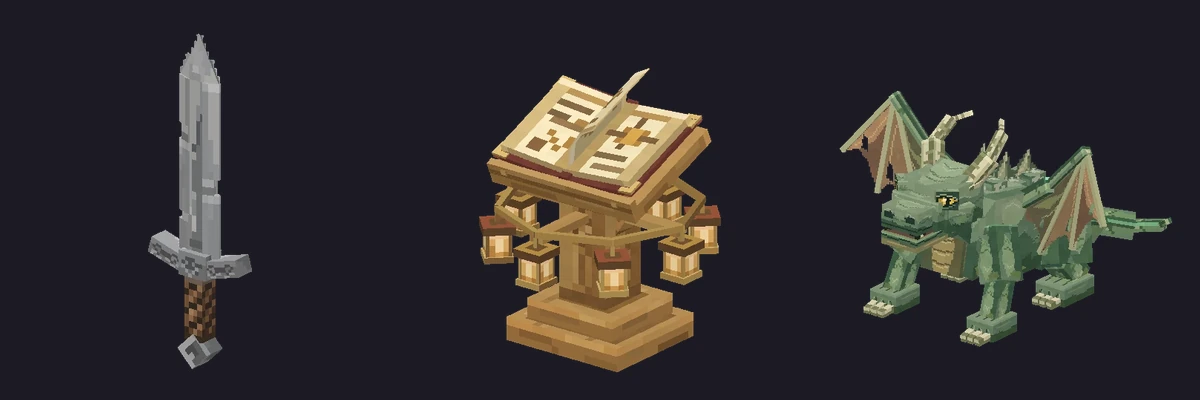
AI makes models and textures, and a coding assistant the Java. Myrlin Studio’s one-click Java mod jar adds one model as an item, a block or a creature with no code; the gameplay stays yours.
On this page7 sections
Five kinds of Minecraft content
| Kind | What it changes | What it needs |
|---|---|---|
| Resource pack | Looks and sounds: textures, models, music, sounds, languages; no code | Nothing; Java and Bedrock each have their own |
| Data pack (Java) | Advancements, loot tables, recipes, functions, even terrain | Nothing; it goes in a world’s datapacks folder |
| Bedrock add-on | A resource pack plus a behavior pack: entity behaviors, loot drops, spawn rules, items, recipes, trade tables | Nothing; add-ons are Bedrock’s official way to customize |
| Mod (Java) | Anything code can change: blocks, items, creatures, systems | A mod loader such as Forge, NeoForge, Fabric or Quilt |
| Server plugin | Server-side features, from small rule changes to game modes and items | A server that loads plugins, such as Paper |
The Minecraft Wiki calls a Java mod unofficial code injected into the game, and notes that server mods are often called plugins, mainly on Spigot and the servers derived from it.
What AI can do today
Models and textures
A generator can hand you finished files: a cube-based model with a painted texture, as a resource pack, an add-on or mod files (textures alone have limits; the whole route).
Code, with a coding assistant
A mod or plugin is compiled Java, a programming project: NeoForge lists “familiarity with the Java programming language” as a prerequisite, with a Java Development Kit, an IDE and a project from its Mod Generator page; Paper’s guide uses a Gradle project in IntelliJ IDEA.
Inside it, Claude Code (opens in a new tab) “reads your codebase, edits files, runs commands”, and Codex (opens in a new tab) is a “lightweight coding agent that runs in your terminal”; either writes the Java, runs the build and explains errors. You decide what the mod does and test it in the game: a passing build is no proof.
With Myrlin Studio connected to your AI, a coding tool can save your model’s Minecraft package into the project.
No-code makers
MCreator (opens in a new tab) is open-source software for making “Minecraft Java Edition mods, Minecraft Bedrock Edition Add-Ons, resource packs, and data packs using an intuitive easy-to-learn interface or with an integrated code editor”.
One-prompt mod generators
Some sites offer a whole mod from one sentence. Check what it is (compiled .jar, source code or data pack), its loader and game version, and whether you can read the code; test on a copy of a world in a separate install.
How far Myrlin Studio’s one-click Java mod jar goes
For Java there is a resource pack, a one-click mod jar, mod resources for your own project and server plugin files. The jar is a finished mod carrying the Myrlin runtime; in Myrlin Studio’s words, “there is no code to write and nothing to register”.
1
model per jar
several models, several jars
4 to 7 min
average Builder v2.0 build
0
credits to download it for Minecraft
- Its kind decides what it becomes: a weapon, item, hat or vehicle becomes a /give item; a prop or block, a placeable block; a creature or character, a spawn egg with its saved animations.
- Loaders: Forge, NeoForge and Fabric (with Fabric API); creatures need GeckoLib, “an animation engine for Minecraft mods”. Current loaders and versions: the Minecraft page.
- Servers: the server and every player need the same Myrlin files, plus GeckoLib for creatures; players can still join other servers.
- Renaming is safe: the mod id comes from the model, so worlds keep the item.
Building a model costs credits; the pricing page shows which plans include the Minecraft downloads.
From a model to a working jar
- Step 1
Make the model
Describe it, add a picture or both, and confirm the price (writing the brief).
- Step 2
Choose the jar
Pick the loader and game version you play.
My assets, then Minecraft download, then Java mod
- Step 3
Install the loader
As the numbered steps in README.txt say, for that game version.
- Step 4
Add the jar
Unzip once and put the .jar from its mods folder into yours, not the ZIP or a folder.
- Step 5
Play
Start the game with the loader, open a world with cheats on and paste the command from README.txt.
Server plugins
The plugin download gives ItemsAdder (opens in a new tab) item and furniture files or a ModelEngine (opens in a new tab) creature blueprint; install that plugin on your server and follow the ZIP’s README to load the model and build the server resource pack. Myrlin Studio does not write plugins.
For a plugin of your own, Paper’s documentation has you drop the .jar in the server’s plugins folder, restart and run /plugins to check that it loaded.
Questions
- Can AI make a Minecraft mod for me?
- Partly: AI makes models and textures, a coding assistant writes Java in your project, and Myrlin Studio’s one-click jar adds a model with no code. Gameplay stays yours.
- Do I need to know Java to make a Minecraft mod?
- Not for packs, MCreator’s visual interface or the one-click jar. Your own mod or plugin needs Java familiarity, NeoForge says, and someone must read and test what an assistant writes.
- What is the difference between a mod and a plugin?
- A mod needs a mod loader; a plugin goes in the plugins folder of a server such as Paper. The wiki notes server mods are often called plugins.
- Does Myrlin Studio’s mod jar work on a server?
- Yes, when the server and every player have the same Myrlin files, plus GeckoLib for creatures.
- Can I make a Bedrock add-on with AI?
- Yes for the model: Myrlin Studio exports a one-click .mcaddon for items, blocks and mobs, with resource and behavior packs. New behavior means editing its JSON, as Microsoft’s creator documentation teaches.
Sources
- Minecraft Wiki: Mods (opens in a new tab): What a mod is, mod loaders, plugins and Bedrock add-ons.
- Minecraft Wiki: Data pack (opens in a new tab): What a data pack can define and where it goes.
- Minecraft Wiki: Resource pack (opens in a new tab): What a resource pack can change.
- Microsoft Learn: Introduction to Behavior Packs (opens in a new tab): What a behavior pack holds.
- PaperMC docs: Adding plugins (opens in a new tab): Installing a plugin, and the warning about trusted sources.
- PaperMC docs: Project setup (opens in a new tab): Setting up a plugin project.
- NeoForge docs: Getting Started (opens in a new tab): What a mod project needs.
- MCreator (opens in a new tab): Its own description, read on 24 November 2026.
- GeckoLib (opens in a new tab): Its own description, read on 24 November 2026.
- Claude Code overview (opens in a new tab): Its own description, read on 24 November 2026.
- Codex (opens in a new tab): Its own description, read on 24 November 2026.
- ItemsAdder wiki (opens in a new tab): The plugin the item and furniture files are for.
- ModelEngine wiki (opens in a new tab): The plugin the creature blueprint is for.
- Myrlin Studio help: Minecraft Bedrock and Java (opens in a new tab): Install steps for the mod jar and server use, read on 24 November 2026.
- Myrlin Studio: add a model to a Minecraft project (opens in a new tab): What the finished mod file becomes, read on 24 November 2026.
- Myrlin Studio for Minecraft (opens in a new tab): Downloads, loaders and versions, read on 24 November 2026.
Facts checked on .
Guides and pages