Blockbench guide
Blockbench armor: the template, armor textures and 3D armor models for Minecraft
Checked on 25 November 2026 against minecraft.wiki, Microsoft Learn, the Fabric, NeoForge and GeckoLib docs, and Blockbench’s own source code and plugin registry.
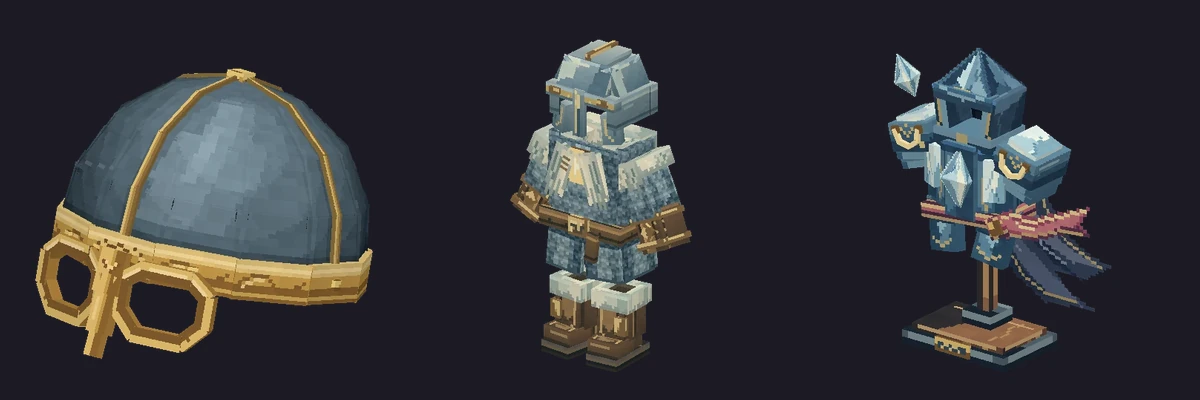
The short answer
Vanilla Java armor is a texture on a fixed shape around the body. Blockbench’s armor template is built in: File, New, Minecraft Skin, then Armor (Main) or Armor (Leggings), a 64 by 32 texture for a resource pack. Without a mod only the helmet slot shows a 3D model; a 3D chestplate, leggings or boots needs a mod such as GeckoLib, or a Bedrock attachable.
On this page11 sections
What a pack can change, and what needs a mod
Java armor is textures on a set shape just outside the body: an equipment asset lists texture layers and no geometry. A resource pack can repaint armor but not reshape a chestplate, and Blockbench’s format table lists armor models only for its Bedrock formats, Modded Entity and GeckoLib.
| Goal | What it takes | Start in Blockbench |
|---|---|---|
| Repaint vanilla armor (Java) | New layer textures in a resource pack | Minecraft Skin, Armor (Main) and Armor (Leggings) |
| New armor look on any item (Java 1.21.2+) | An equipment asset and the item’s equippable component | The same templates |
| 3D helmet or hat (Java) | An item model worn in the head slot | Java Block/Item, Display, Head |
| 3D chestplate, leggings or boots (Java) | A mod, such as GeckoLib’s armor renderer | GeckoLib Animated Model, Model Type Armor |
| Custom armor (Bedrock) | A wearable item and an attachable | Bedrock Entity, or the Minecraft Item Wizard |
The Blockbench armor template
The template ships with Blockbench, no plugin needed. The Minecraft Skin format has two adult armor presets: Armor (Main) for the helmet, chestplate, arms and boots, and Armor (Leggings) for the belt and legs.
- Step 1
Create the project
Set Model to Armor (Main) or Armor (Leggings). Leave Resolution at default for a 64 by 32 file.
File, then New, then Minecraft Skin
- Step 2
Pick a texture source
Generate Template gives a blank layout, Texture File opens your PNG, and Load from Minecraft downloads Mojang’s iron armor texture once you accept the Minecraft EULA.
- Step 3
Paint and save
Paint in the Paint tab; the shape is locked (“The model cannot be changed” in this format). Then right-click the texture in the Textures panel and choose Save As.
Template numbers
64 x 32
pixels per armor template at default resolution
1 px
how far the main armor sits out from the body
leggings: 0.5 px
3
texture files per humanoid armor set
since 26.1, with the baby layer
Armor plugins in Blockbench’s registry
- GeckoLib Models & Animations (Java mods): Model Type Armor starts from bones such as armorHead, armorBody and armorLeftBoot, one per body part.
- Minecraft Item Wizard (Bedrock, by JannisX11 and Mojang Studios): Helmet, Chestplate, Leggings and Boots presets that write both packs. “Wearable items always use a 3D model when equipped, and a flat icon in hand.”
- Armor Exploded View (July 2026): View, Toggle Armor Exploded View pulls the armor parts apart for inspection, and back.
How to texture armor in Blockbench
Armor (Main) puts the helmet, chestplate, arms and boots on one file. Armor (Leggings) is a second file that reuses the same spots: the belt where the chestplate goes, the legs where the boots go. So boots go on the first file, leg armor on the second. More texture tools: Blockbench textures.
| Minecraft Java | Helmet, chestplate, boots | Leggings |
|---|---|---|
| Before 1.21.2 | models/armor/<material>_layer_1.png | models/armor/<material>_layer_2.png |
| 1.21.2 and later | entity/equipment/humanoid/<material>.png | entity/equipment/humanoid_leggings/<material>.png |
Name files after the material you replace, such as humanoid/iron.png. Leather adds a leather_overlay.png beside each tinted base layer. Since 26.1 baby humanoids wear their own humanoid_baby texture (Blockbench has an Armor (Baby) preset). The pack itself: how to add a custom model to Minecraft.
New armor without a mod: equipment assets
Since Java 1.21.2 a resource pack can define an equipment asset: JSON in assets/<namespace>/equipment/ (models/equipment/ before 1.21.4) listing texture layers. humanoid covers head, chest and feet, humanoid_leggings the legs; mypack:ruby means assets/mypack/textures/entity/equipment/<layer type>/ruby.png.
{
  "layers": {
    "humanoid": [ { "texture": "mypack:ruby" } ],
    "humanoid_leggings": [ { "texture": "mypack:ruby" } ]
  }
}
An item wears it through its equippable component, whose asset_id names the asset (model before 1.21.4). The component lives on the item, so test with a command:
/give @s iron_chestplate[equippable={slot:"chest",asset_id:"mypack:ruby"}]Custom model data and armor
custom_model_data (lists of floats, flags, strings and colors since 1.21.4) feeds items model definitions, which choose the model an item renders as. The worn look comes from the equipment asset that asset_id names, so a piece with its own icon and worn texture needs both.
A 3D helmet or hat without a mod
The head slot is the exception: an item with equippable and no asset_id, or an asset without a humanoid layer, shows the item’s own model on the head, at its head display position. Model the hat in Blockbench’s Java Block/Item format, place it under Display, Head, and point an item at it with item_model (a definition in assets/mypack/items/, 1.21.4 and later):
/give @s paper[equippable={slot:"head"},item_model="mypack:crown"]3D armor in a Java mod: GeckoLib
Fabric and NeoForge mods still dress armor with equipment assets and layer textures. For a shape of your own, GeckoLib (MIT; Fabric, Forge, NeoForge and Quilt) renders armor from a Blockbench model:
- Step 1
Install the plugin
Add GeckoLib Models & Animations from the plugin list.
File, then Plugins
- Step 2
Start from the armor template
Set Model Type to Armor, then “ONLY add bones and cubes into the armor prefixed bones”, as GeckoLib’s wiki puts it.
File, then New Project, then GeckoLib Animated Model
- Step 3
Export to the armor folders
Name the files after the item’s registered id, under
assets/<mod_id>/:geckolib/models/armor/,geckolib/animations/armor/andtextures/armor/. - Step 4
Write the item and renderer
An item class, its registration and a
GeoArmorRenderer, which needs no class of its own without custom handling.
An existing model converts with File, Convert Project. Making it move: Blockbench animation.
Bedrock: attachables
Bedrock renders armor with attachables, resource pack files that, in Microsoft’s words, “define how items render when equipped or held by entities”. Mojang’s iron chestplate is one, with textures/models/armor/iron_1 and geometry.player.armor.chestplate. A custom piece needs:
- A behavior pack item with
minecraft:wearableand a slot such asslot.armor.chest(format version 1.20.30 or later; armor slots stack to 1). - A Bedrock Entity geometry whose bones carry
"binding": "q.item_slot_to_bone_name(context.item_slot)", so they follow the slot. - An attachable in
attachables/naming the item, thearmormaterials, the texture, the geometry andcontroller.render.armor; Microsoft’s crown also setsvariable.helmet_layer_visible = 0.0;inparent_setup.
The Minecraft Item Wizard writes the packs from an armor preset; you then shape the model in Blockbench. Armor trims need format_version 1.20.60 or later.
When the armor does not show
- Invisible armor: a missing layer texture or equipment asset (Fabric: “When an entity wears your armor, nothing will be shown”), or a layer type the asset leaves out.
- Black and magenta checkerboard: the missing texture, almost always a wrong file name; since 1.21.2 the files live under
entity/equipment/. - A 1.21.2 pack stopped working: 1.21.4 moved
models/equipment/toequipment/and renamedmodeltoasset_id. - Missing model on a hat:
item_modelpoints to a definition that does not exist. - HumanoidModel not found (GeckoLib): with split sources, the armor renderer belongs in your client sources.
Where Myrlin Studio fits
Myrlin Studio, ours, builds a blocky 3D model with a painted texture in about 15 to 17 minutes, and every model offers a .bbmodel download that opens in Blockbench with its full named part hierarchy. Its Bedrock add-on covers characters and mobs, held items or blocks, its Java resource pack items and blocks or furniture; its live pages list no armor export. Free models to start from: free Blockbench models.
Questions
- Does Blockbench have an armor template?
- Yes, built in: File, New, Minecraft Skin, then Armor (Main) or Armor (Leggings). The GeckoLib plugin adds an Armor model type for mods.
- Can a resource pack add custom 3D armor models in Java?
- Only on the head, where an item’s own model shows. Other pieces stay textures on the vanilla shape; 3D needs a mod such as GeckoLib.
- How do I texture armor in Blockbench?
- Paint the Armor (Main) and Armor (Leggings) templates, save each 64 by 32 file and put them in textures/entity/equipment/humanoid and humanoid_leggings (1.21.2 and later).
- Does custom model data change how worn armor looks?
- Not by itself. custom_model_data picks the model the item renders as; the worn look comes from the equipment asset that asset_id names.
- Is there a Blockbench armor plugin?
- Yes: GeckoLib Models & Animations for Java mods, Minecraft Item Wizard for Bedrock and Armor Exploded View for inspection. The vanilla template needs no plugin.
Sources
- minecraft.wiki: Equipment (opens in a new tab): Equipment assets, layer types, texture paths, the head slot fallback, the 1.21.2 and 1.21.4 changes.
- minecraft.wiki: Data component format (opens in a new tab): equippable (slot, asset_id), custom_model_data, item_model, examples and history.
- minecraft.wiki: Java Edition 1.21.2 (opens in a new tab): Armor textures moved from models/armor to entity/equipment, layer_1 and layer_2 renamed.
- minecraft.wiki: Model (opens in a new tab): The head display position.
- minecraft.wiki: Missing textures and models (opens in a new tab): The black and magenta missing texture.
- Microsoft Learn: Using Attachables (opens in a new tab): The attachables folder and slot binding.
- Microsoft Learn: minecraft:attachable (opens in a new tab): What attachables do and their fields.
- Microsoft Learn: minecraft:wearable (opens in a new tab): Armor slots, stack size, format version 1.20.30.
- Microsoft Learn: How to Add Custom Items (opens in a new tab): The crown helmet attachable and armor trims on a custom chestplate.
- Microsoft Learn: Minecraft Item Wizard (opens in a new tab): Installing the plugin and the Wearable option.
- Mojang bedrock-samples: iron chestplate attachable (opens in a new tab): Vanilla armor as an attachable.
- Fabric Documentation: Custom Armor (opens in a new tab): Armor textures, the equipment definition and the three texture layers.
- NeoForged docs: Armor (opens in a new tab): Equipment assets and the armor render layers.
- GeckoLib Wiki: Armor (opens in a new tab): The steps for GeckoLib armor.
- GeckoLib Wiki: The armor renderer (opens in a new tab): GeoArmorRenderer and the armor file paths.
- GeckoLib Wiki: Armor common issues (opens in a new tab): HumanoidModel not found.
- GeckoLib Wiki: Plugin usage (opens in a new tab): The Armor model type and converting a model.
- Modrinth: GeckoLib (opens in a new tab): MIT; Fabric, Forge, NeoForge and Quilt; updated 23 November 2026.
- Blockbench source code (opens in a new tab): GPL-3.0. The Minecraft Skin armor presets, their sizes and the texture menu, read on 25 November 2026.
- Blockbench Wiki: Formats (opens in a new tab): Which formats make armor models.
- Blockbench plugin registry (opens in a new tab): GeckoLib Models & Animations, Minecraft Item Wizard and Armor Exploded View, 25 November 2026.
- Myrlin Studio for Minecraft (opens in a new tab): Build time and the Minecraft export types, read on 25 November 2026.
- Myrlin Studio for Blockbench (opens in a new tab): The .bbmodel download, read on 25 November 2026.
- Myrlin Studio pricing (opens in a new tab): Free credits, the price of a model and which plans include downloads, 25 November 2026.
Facts checked on .
Guides and pages